Plan in Claude. Lift in Block. Pro
Connect Claude to your Block account by signing in. Claude can then read every session you logged, and it answers with your numbers. Ask it for a training block, and it saves the workouts and the weeks into Block.
Part of Block Pro. Works with Claude on every plan, and with Gemini in the US.
Months of training in one chat Pro
The AI trainer (iOS 27) answers between sets in the Block app. A connected assistant suits the long work, such as a review of your last block or a plan for a competition.
- Plan in your own assistantAdd Block to Claude once, on the web or in Claude Desktop. The Claude app on your phone then has it too. On a computer, Claude can also read a coach's notes or a spreadsheet of old maxes next to your Block log.
- Read your whole historyClaude reads your sessions set by set, with the lamps of each judged set, and each lift's records and estimated max. One conversation can cover months: which lift stalled and when, or what you lifted in the weeks before a record.
- Log from anywherePaste a session from your notes, in pounds or kilograms, and Claude logs it in Block. Say which workout it was, and the lamps judge the session against that workout. The next time you start the workout, the app sets its targets from that session.
- Build a training blockGive Claude a date to train for, such as a competition, and the days you can train. It reads your history and the research, writes each workout and saves the block: a weekly schedule or a rolling cycle, with a deload. Ask for the plan as a document too, to keep in Claude.
- Cite the same researchThe assistant gets the same 37 research cards as the AI trainer, most with links to their studies. Block asks it to cite the study in brackets after each recommendation, for example (Schoenfeld 2017), and to say when the evidence is limited.
- Sign in onceClaude opens Block's sign-in page. You sign in with your Block email and allow the connection. You need no key. Revoke the connection in the Block app at any time, and its access to your data ends at once.
Ask in your own words
Type these into Claude once Block is connected. Each request shows what Claude does in Block.
Read my last 12 weeks in Block and tell me which lift is stalling.
Claude reads your sessions with
list_workoutsand each lift's records withexercise_history. It names the lift and shows the numbers. It changes nothing.Set my next targets for Upper B from yesterday's session.
Claude reads the session set by set and the research cards. It proposes each lift's next load and reps, with a source for each. It saves them with
save_routineafter you agree. The app has its own call for each lift, which your next Start saves. A lift Claude saved with other numbers keeps Claude's.Build a 12-week block for my powerlifting competition on 14 March and save it to Block.
Claude reads your profile and your history, then sets out the workouts and weeks in the chat. After you agree, it saves each workout with
save_routineand the block withsave_block.Log this as today's Lower A: squat 3 × 5 at 315, RDL 3 × 8 at 225, leg press 3 × 12 at 360.
Claude finds Lower A and each lift, and logs the session with
log_workout. The lamps judge it against Lower A. The next time you start Lower A, the app sets its targets from this session.Why did my bench hold last Thursday?
Claude opens the session with
get_workoutand reads each set's lamps. It tells you which set missed and which lamp was red.How many working sets per muscle did I do each week this month?
Claude counts the sets in your sessions and looks up each lift's muscles with
search_exercises. Block marks warm-ups, so Claude can leave them out.I travel next week with dumbbells only. Write hotel versions of Upper A and Lower A.
Claude finds dumbbell lifts and says what each new workout holds. It saves them with
save_routineunder new names, so your own workouts stay as they are.Change my block to 2 days on, 1 day off, for 8 cycles.
Claude reads the block with
list_routinesand says what the change does to its weeks and training days. Then it saves the rolling cycle withsave_block.Which lifts set a record in my last block?
Claude reads each lift's all-time records and their dates with
exercise_history, and lists the ones inside the block's weeks.Write my plan for the competition as a document, week by week, from my best sets.
Claude reads your history and writes the plan as a document you keep in Claude. It saves nothing to Block until you ask.
Connect Claude Pro
You need the Block app with Block Pro, and a Claude account. On the Free, Pro and Max plans, you add the connector yourself. The free plan allows one custom connector.
On a Team or Enterprise plan, an owner adds Block first, in Organization settings > Connectors. Members then connect it in Customize > Connectors.
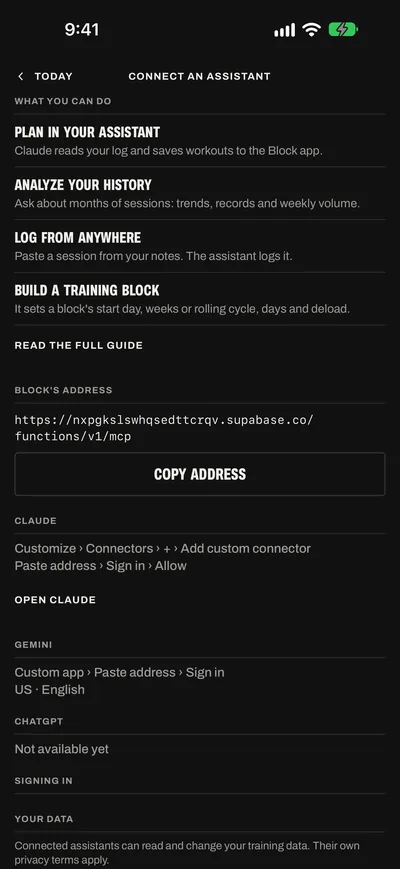
Open Connect an assistant
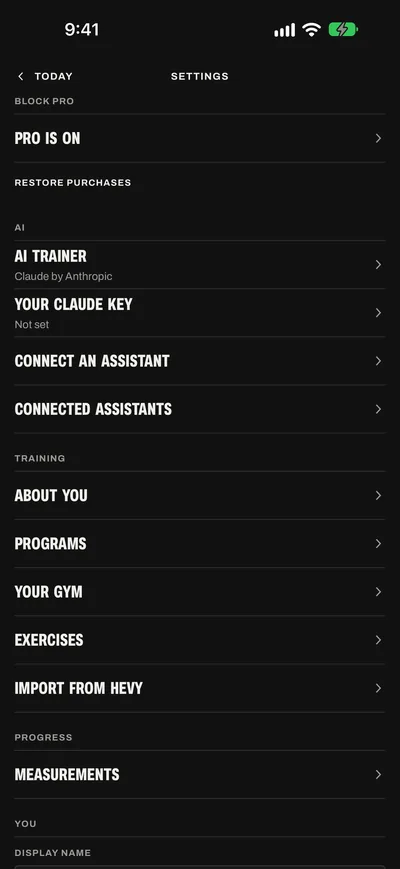
In the Block app, tap the gear on Today to open Settings. Under AI, tap Connect an assistant.
Copy Block's address
Tap Copy address. The button then reads Copied. On a computer, copy the address from here:
https://nxpgkslswhqsedttcrqv .supabase.co /functions /v1 /mcp Add Block to Claude
On claude.ai or in Claude Desktop, open Customize > Connectors. Click +, then choose Add custom connector.
Name it Block. Paste the address as the server URL. Click Add.
If the dialog shows sign-in settings, keep the settings that Claude marks Detected. Block needs no client ID or secret.
On your iPhone, the Open Claude link on Connect an assistant opens this page of claude.ai.
Sign in to Block
Claude opens Block's sign-in page. If it does not, click Connect beside Block in Connectors.
Enter your Block email and click Send code. Enter the code from the email and click Sign in. To sign in with your password, click Use a password instead.
Signed up with Apple? Set a password first.
Allow the connection
The page names the assistant. It lists what the assistant will be able to do, and what it will not. Click Allow. The page returns you to Claude.
Ask a first question
Start a chat in Claude and ask: “What did I lift in my last session in Block?” Claude calls
list_workoutsand answers with your sets. If Claude asks you to allow a Block tool, allow it.In the Block app, Today > Settings > AI > Connected assistants now lists the connection.
On your phone: add Block once, on claude.ai or in Claude Desktop. The Claude app on your iPhone or Android phone then has it too.
Signed up with Apple
An account made with Sign in with Apple has no password. Set one in the Block app, then sign in on Block's page with it.
Open Today > Settings > AI > Connect an assistant. Under Signing in, tap Set a password. The button shows on an account made with Sign in with Apple.
Enter a password of at least 8 characters. Enter it again. Tap Set password.
On Block's sign-in page, choose Use a password instead. Enter the email that Connect an assistant shows, and your new password.
The email can be different from the one you use every day. If you chose Hide My Email when you signed up, it is an Apple relay address that ends in privaterelay.appleid.com.
Copy email, beside the email on Connect an assistant, copies it.
If your Apple account shares your real email, you can also click Send code on the sign-in page. Block emails the code to that address.
Gemini and ChatGPT
- GeminiAt gemini.google.com, open Menu > Settings > Connected Apps > Add a custom app. Paste Block's address. Sign in and allow the connection, as for Claude. Gemini's phone app then has it too. For custom apps, Gemini needs you to be 18 or over and in the US, with a personal Google Account, Keep Activity on and Gemini in English. Block's sign-in in Gemini is not tested yet.
- ChatGPTBlock is not in ChatGPT's app directory yet. On ChatGPT Business, Enterprise and Edu plans, developer mode can add a custom app on the web. Block is not tested there yet.
- Claude CodeIt signs in on the same page. See Claude Code and scripts.
The 16 tools Pro
The assistant acts as you in Block through 16 tools. It sees only what they return. The tools use kilograms, and Block asks the assistant to answer in your unit.
| Tool | Kind | What it reads or changes |
|---|---|---|
get_profile | Reads | Your units, default rest, gym (plates and bars) and About you. |
list_workouts | Reads | Your sessions, newest first, set by set with each set's lamps. Up to 100 at a time, from any dates. |
get_workout | Reads | One session with every set. |
exercise_history | Reads | One lift's recent sessions with the heaviest set, estimated max and volume of each, and the lift's all-time records. |
list_routines | Reads | Your workouts with their sets, and your folders and training blocks with their weeks, training days or rolling cycle. |
search_exercises | Reads | The library of 628 lifts and your custom exercises, by name, muscle or equipment. |
list_body_measurements | Reads | Body weight, body fat and circumferences, newest first. |
app_help | Reads | Block's help, to answer questions about how to use the app. |
research | Reads | The 37 research cards, each with its level of evidence, most with links to their studies. |
log_workout | Changes | Logs a session, or changes one. It saves each set it sends as a logged set. |
save_routine | Changes | Makes a workout or changes one: its lifts, sets, reps or rep range, loads, rest, target RPE, prep lifts, notes and folder. |
save_block | Changes | Makes a training block or changes one: its name, start day, weeks, deload, training days or rolling cycle. It can also turn a block back into a folder. |
create_exercise | Changes | Adds a custom exercise. |
log_body_measurement | Changes | Adds a body measurement. |
delete_routine | Deletes | Deletes a workout. The sessions you logged from it stay. |
delete_workout | Deletes | Deletes a session and its sets. |
Changes save when the tool runs. The AI trainer waits for you to tap Apply. An assistant's tools do not wait. Block asks the assistant to read before it changes anything, and to say what a change does before it makes it.
In Claude, you can set each Block tool's permission in Customize > Connectors. Claude never runs a tool set to Blocked.
Without Block Pro, an assistant can sign in and read Block's help and the research cards. Every other tool answers: Block Pro is required for connected assistants. The connection works again while the account has Pro.
Block Pro is $4.99 a month, or $39.99 a year with a one-week free trial for new subscribers.
What it cannot do
- See your passwordYou type it on Block's sign-in page, never in the assistant.
- Touch API keys or your accountIt has no access to API keys, and it cannot delete your account.
- Read the AI trainer's chat or allowanceThe trainer's chat stays on your iPhone. An assistant cannot read or use the trainer's monthly messages.
- Change your settingsIt can read About you and your gym, but no tool changes them.
- See a session you have not savedA session in progress stays on your iPhone until you save it from the scoresheet.
Disconnect an assistant
Revoke the connection in the Block app. Its access to your data ends at once.
Open Today > Settings > AI > Connected assistants.
Tap Revoke beside the assistant.
Tap Revoke again to confirm.
Its sign-in cannot renew itself. What it saved stays in Block.
Listing and revoking connections is free, with or without Block Pro.
To connect it again, use the assistant's connector settings. To take Block out of Claude, remove it in Customize > Connectors.
What the assistant receives
The assistant receives what its tools return: your sessions, workouts, blocks, exercises, body measurements and profile.
What it receives follows the assistant's own privacy terms: Anthropic's for Claude, and Google's for Gemini.
Your password goes only to Block, on Block's sign-in page. The assistant gets a sign-in that you can revoke.
Deleting your Block account deletes its connections too. The privacy policy has the details.
Assistant or AI trainer
Both read the same log and the same research. Use the AI trainer (iOS 27) in the gym, and a connected assistant at a desk.
| Compare | AI trainer | Connected assistant |
|---|---|---|
| Where | In the Block app on your iPhone. | In Claude or Gemini, on any device that runs it. |
| Needs | Block Pro and iOS 27. | Block Pro, and an account with the assistant. |
| Changes | A card with Apply. Nothing changes until you tap it. | Saved when a tool runs. Block asks the assistant to say what changes first. |
| In a session | Sees the sets you logged and changes the sets you have not. | Reads saved sessions only. |
| Messages | Up to 60 Claude messages a month, within a monthly cost limit. With your own Claude key, Block sets no limit. | The limits of your plan with the assistant. |
Claude Code and scripts Pro
Claude Code
Claude Code connects to the same address and signs in on the same page. Run this command in a terminal:
claude mcp add --transport http block https://nxpgkslswhqsedttcrqv.supabase.co/functions/v1/mcp
Start Claude Code. Run /mcp. Choose block. Sign in to Block in the browser that opens. Click Allow.
To use Block in every project, add --scope user after add.
API keys
Today > Settings > Advanced > API Keys makes keys for scripts that call Block's API (Block Pro).
Claude, Gemini and Claude Code need no key. They sign in.
When something does not work
The sign-in page says Wrong email or password
An account made with Sign in with Apple has no password. In the Block app, open Today > Settings > AI > Connect an assistant. Tap Set a password. Then sign in with the email that screen shows. See Signed up with Apple.
The code does not come
Look in spam for an email from no-reply@lnkd.world. The code expires in one hour. For a new code, click Send code again.
Claude says Block Pro is required
The Block account you signed in with has no Block Pro. Subscribe in the Block app in Today > Settings > Block Pro, or tap Restore purchases there. The connection works again once the account has Pro. You do not need to connect again.
Claude shows no Block tools
In the chat, open + > Connectors. Turn Block on. If Customize > Connectors asks you to connect Block, sign in again.
Claude says the sign-in to Block has expired
The connection was revoked, or its sign-in ended. In Claude, open Customize > Connectors. Connect Block again. Sign in on Block's page.
I saved a block in Claude, and the Block app does not show it
Pull down on Today or Plan to load your data again. The app also loads it again when you come back to it after five minutes.
How do I connect a different Block account?
A connection belongs to the Block account that signed in. On that account, revoke it in Today > Settings > AI > Connected assistants. In Claude, remove Block in Customize > Connectors. Add it again, and sign in with the other account. On the sign-in page, Not you? stops the request for the account shown.
Can two assistants connect at once?
Yes. Each connection has its own row and its own Revoke in Connected assistants. Claude in all its apps is one connection. Claude Code is another.
Does an assistant use the trainer's messages?
No. The AI trainer in the Block app has up to 60 Claude messages a month, within a monthly cost limit. An assistant runs on your plan with that assistant, and its limits apply.