Strength, built in blocks.
Block is a lifting log for iPhone. Plan a block of weeks, then lift it one set at a time. With Block Pro, three lamps judge each set, and a written rulebook works out your next loads in the plates you own.
Free to download and free to log. Block Pro is $4.99 a month, or $39.99 a year with a one-week free trial for new subscribers. For iPhone on iOS 17 and later.
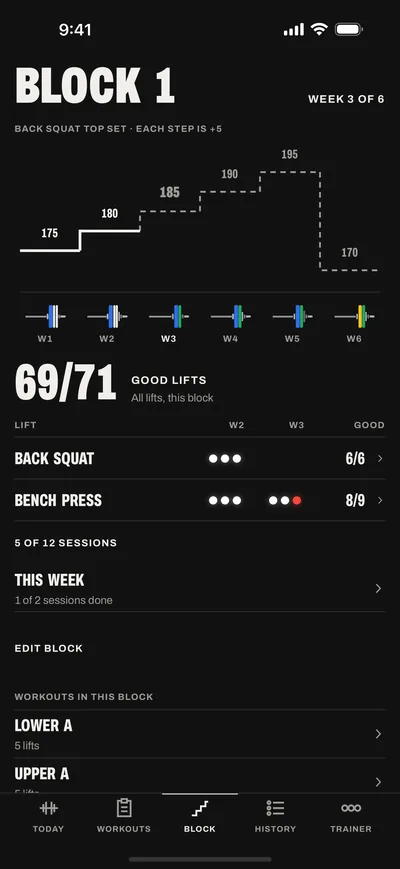
- Week 1: 175 lb, the start. A good lift.
- Week 2: 185 lb, up 10. Short on reps: a red lamp.
- Week 3: 185 lb again, held by the red lamp. A good lift.
- Week 4: 195 lb, up 10. A good lift.
- Week 5: a deload at 175 lb, lighter for that week only.
- Week 6, next: 205 lb, the step week 4 earned.
How a block runs
You plan the weeks once. After that, every session starts from the last one.
Plan the block
Group your workouts into a block: a start date, a number of weeks and an optional deload week. Set your training days. Today shows the session of the day.
Lift the session
Log each set as you lift it, in the plates you own. With Block Pro, three lamps judge the set while you rest.
Start from the next load
After the session, the rulebook writes each lift's call. Today shows it, and Start session saves it to the workout.
Three lamps on every set Pro
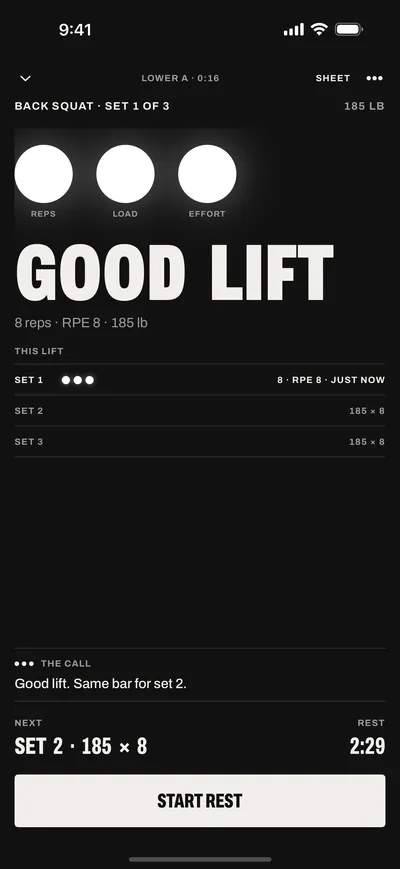
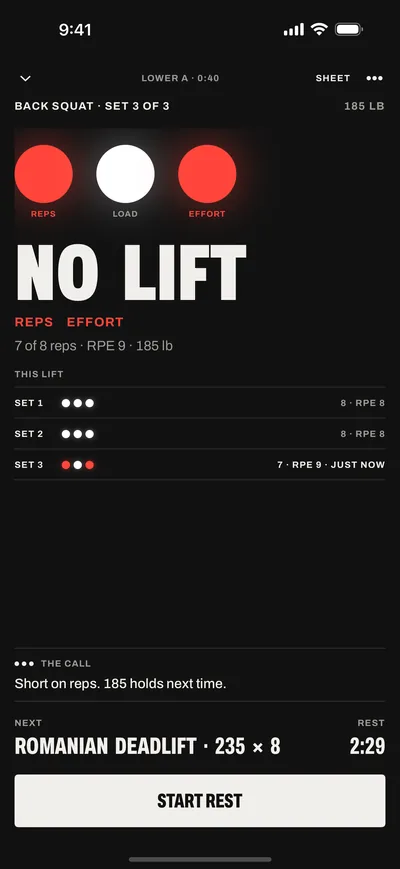
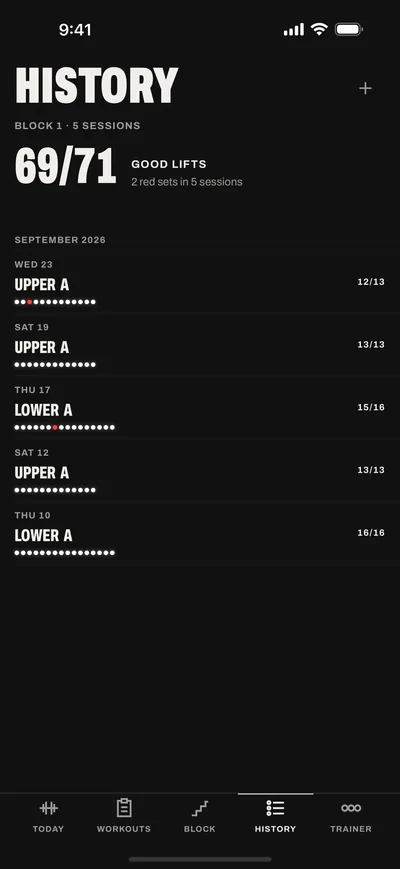
Each set with a target gets three lamps. White is a pass. Red is a miss, and the reason shows under it.
- RepsWhite when you did every rep the set asks for.
- LoadWhite when the bar was at the planned load. For an assisted lift, at most the planned load.
- EffortWhite at or under the lift's target RPE (8 unless you set one). No RPE counts as a pass.
Three white lamps make a good lift. One red lamp makes a no lift. A weight-and-reps set that beats the target's estimated max passes reps and load. Warm-ups and drop sets are not judged.
The lamps are part of Block Pro. Without Pro, you log the same sets with no lamps.
The rulebook moves the weight Pro
After each session, the rulebook works out every lift's next targets. Today shows each call, and Start session saves it to the workout. You never work out a load yourself.
Next targets
Lower A, from today's session. Start session saves them.
| Lift | Next load |
|---|---|
Back Squat3 good lifts at RPE 8. | 195+10 |
Romanian DeadliftShort on reps in set 4. Same load next time. | 235Hold |
Walking Lunge3 good lifts at RPE 7. Reps before load: 3 × 12. | 30Reps +1 |
Lying Leg Curl3 good lifts at RPE 8. Top of the range: the load goes up and the reps start again at 10. | 150+5 |
Standing Calf RaiseNot lifted in this session. | 90Same |
Five rules
| 1 | A good lift: all reps, full load, RPE at or under the target RPE. | |
|---|---|---|
| 2 | Every set a good lift: the load goes up a step.10 lb or 5 kg for a big lower-body lift, 5 lb or 2.5 kg for any other lift. In a rep range, a rep comes first. | +10Reps +1 |
| 3 | Any red lamp: same load next time. | Hold |
| 4 | A second red lamp in a row at the same load: reset about 10% and build back. | Reset |
| 5 | Deload week: a lighter bar and fewer sets.Start saves the step earned before it. | Deload |
- SameThe load does not move.
- KeepHold a lift's row on Today and choose Keep: it stays where it is.
Every new load is one your gym can make. With the AI trainer (Pro, iOS 27), ask why a lift moved, or ask it to move one further, with the research behind it.
Loads in the plates you own Free
Tell Block which plates and bars you have. Every load is drawn with them, with the fewest plates per side.
Your workout's warm-up sets come before the work sets, each drawn in your plates. The AI trainer (Pro, iOS 27) writes warm-ups by your own rule. Warm-ups are not judged.
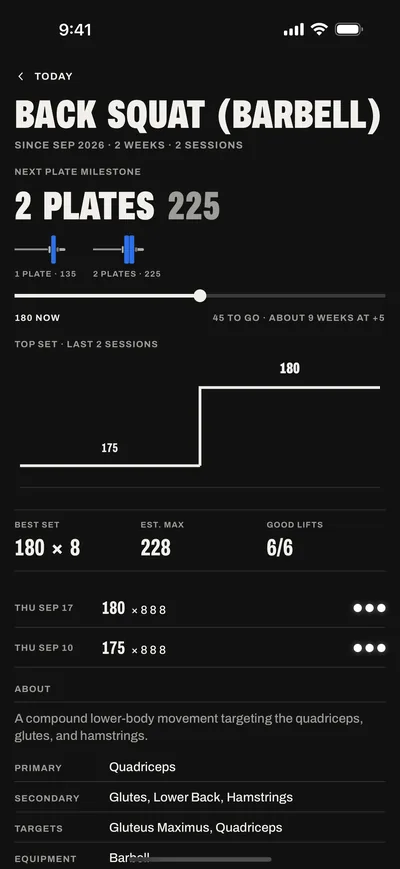
Each lift shows its next plate milestone: one plate a side, then two. Its chart shows the top set week by week.
The week on one screen Pro
A block groups your workouts for a set number of weeks, with an optional deload week. Set the training days, and Today shows the session of the day.
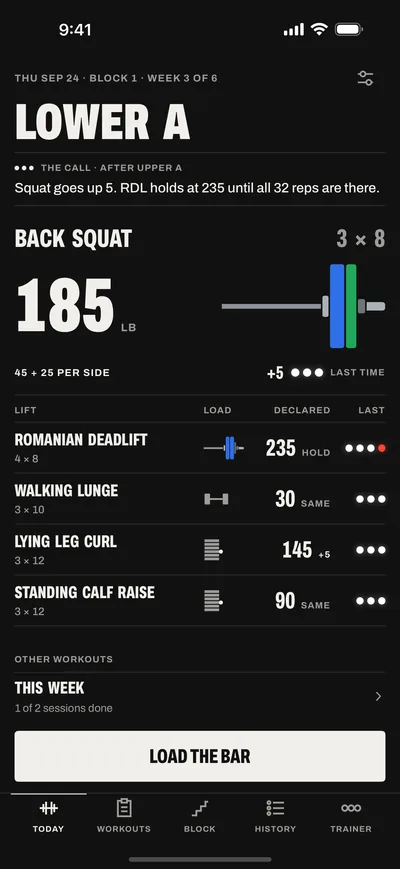
A lamp for each training day: white for a session done, red for a session missed. Miss a day, and the app moves the session to the next free day of the week. Accept the move, or pick another day.
The step chart shows the top set of a lift week by week, in the plates it takes. The block counts your good lifts.
Training blocks are part of Block Pro. Without Pro, a block works as a folder of workouts.
Ask the trainer why ProiOS 27
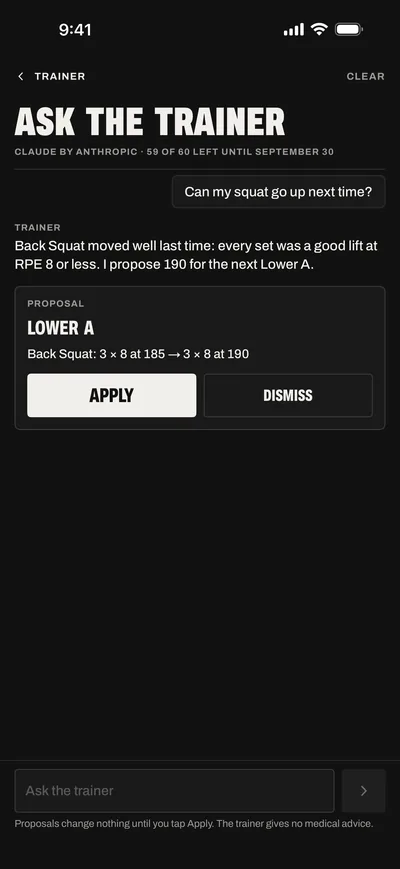
On iOS 27, the AI trainer reads your log and explains each call. It moves a missed session and builds your next block.
Every change it makes comes as a proposal, and it saves only when you tap Apply. After each judged session, it proposes your next targets, starting from the rulebook's calls.
Open it with Ask trainer on Today or Plan, or with the trainer button in a session.
Claude by Anthropic answers once you allow it. Block Pro includes 60 Claude messages a month.
On iPhones with Apple Intelligence, Apple's model on Private Cloud Compute answers instead. Apple does not store the request.
Have your own Anthropic API key? Add it in Settings. Claude then answers first, on your account, with no monthly limit.
Bring the assistant you already use Pro
Add Block to Claude by signing in. There is no API key to copy.
A connected assistant reads your log and plans your workouts as you. It can log a session for you. It cannot see your password. It cannot make API keys or delete your account.
Disconnect it at any time in Today > Settings > Connected assistants.
Bring your Hevy history Free
Import your Hevy sessions from its CSV export. Or use a Hevy API key to bring your routines too.
Every exercise is matched to the library. You check each match before the import. Nothing changes in Hevy. Importing again skips what is already here.
The import is free.
Hevy is a trademark of its owner. Block is not affiliated with Hevy.
The rest of the log Free
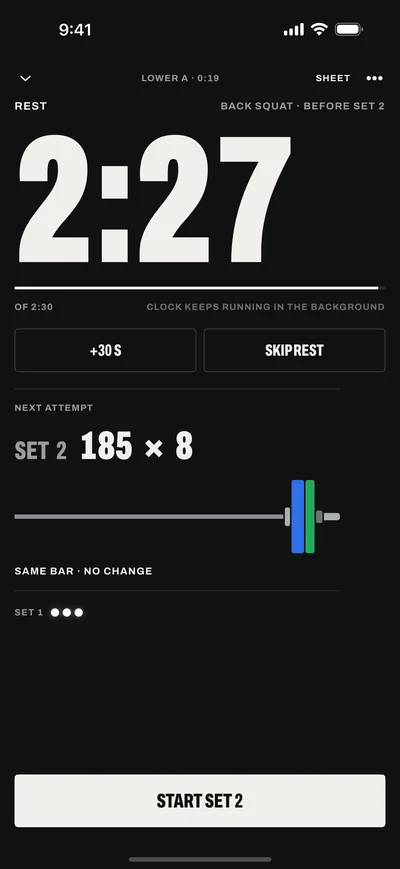
- Rest clockOn the Lock Screen and in the Dynamic Island. It keeps running in the background.
- Widgets and SiriA next-session widget. Ask Siri "What's my workout in Block" or "Log a set in Block".
- 628 exercisesWith instructions. Add your own custom exercises.
- Records and chartsA chart for every lift, with its best set and estimated max.
- 21 programsBuilt from 37 research cards. Without Pro, a program starts as a folder of workouts.
- And moreSupersets, body measurements, kg or lb, and edits to past sessions. Sign in with Apple or email.
Free to log.
Pro to progress.
Logging, your plates and the Hevy import cost nothing. Block Pro adds the lamps, the rulebook's next targets and blocks.
Free
$0
- Logging and history
- Workouts: the plans you build
- The Hevy import, by CSV or API key
- Warm-ups and loads in your plates
- Rest clock in the Dynamic Island
- Widgets and Siri
- 628 exercises and 21 programs
Block Pro
$4.99a month
Or $39.99 a year, with a one-week free trial for new subscribers.
- Three lamps on every set with a target
- Next targets after each session
- Blocks with a weekly schedule and a deload week
- The AI trainer, on iOS 27
- Connected assistants, such as Claude
- API keys for tools on your computer
Prices in U.S. dollars. Other countries follow the App Store. Apple bills Block Pro to your Apple Account. It renews until you cancel it in your Apple Account settings, at least 24 hours before the end of the period. The free trial becomes Pro Yearly unless you cancel before it ends. Terms of Use, Privacy Policy.
Short answers
Which iPhones?
iPhones on iOS 17 and later. The AI trainer needs iOS 27.
What is a block?
A set number of weeks of the same workouts, with an optional deload week at the end. The loads move from week to week by the rulebook. Blocks are part of Block Pro.
What is a good lift?
With Block Pro, a set with a target and three white lamps is a good lift. One red lamp is a no lift. Warm-ups and sets without a target are not judged.
Do I have to rate my effort?
No. A set without an RPE passes the effort lamp. An RPE over the lift's target (8 unless you set one) turns it red.
Is the import free?
Yes. The import, logging, workouts and history are free. Block Pro adds the lamps and next targets.
Does the trainer give medical advice?
No. The AI trainer (Pro, iOS 27) keeps to your training and your log. For pain or an injury, it tells you to stop that movement and see a doctor or a physical therapist.
Where is my data?
In a database at Supabase, on Amazon Web Services. It is encrypted in transit and at rest, and no other account can read it. The app has no ads and no analytics SDKs. The privacy policy has the details.
Can I delete my account?
Yes. Today > Settings > Delete Account removes your account and all training data at once. It does not cancel a Block Pro subscription.