Sonnet 5 on every message ProiOS 27
Add your own Anthropic API key to the AI trainer. Claude Sonnet 5 then answers every message, and Block sets no monthly limit. Anthropic bills your Claude Console account for what you use.
You need Block Pro, iOS 27 and a Claude Console account with credit.
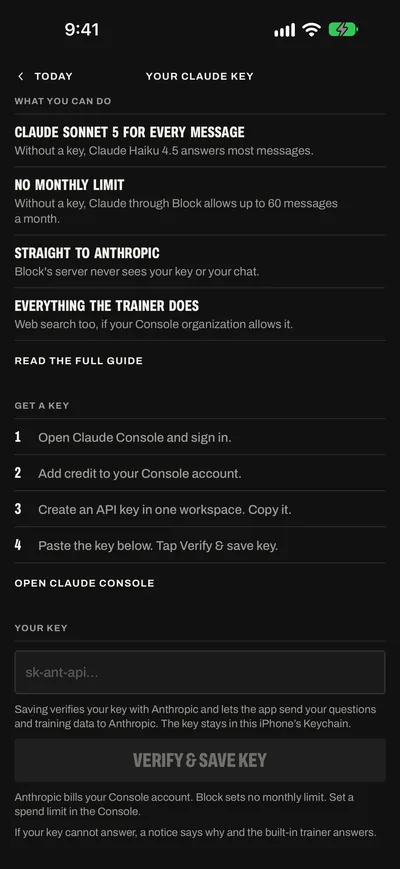
What your key changes ProiOS 27
Your key changes which model answers and who pays. The trainer works as before: it reads your log, cites its research and puts every change on a card with Apply. Web search works too when your Anthropic organization allows it.
- Sonnet 5 for quick questions tooThrough Block, Claude Haiku 4.5 answers most messages. Claude Sonnet 5 answers when you build a block or a program, when the app asks for your next targets, and when the trainer writes your rules file. With your key, Claude Sonnet 5 answers every message. Each answer can be up to 8,192 tokens long. A Haiku answer stops at 1,500 tokens.
- No monthly limit from BlockThrough Block, Block Pro includes up to 60 Claude messages a month, within a monthly cost limit. Heavy use of Sonnet 5 can end the month's messages sooner. With your key, Block sets no limit. Your credit and your Console limits still apply.
- A 16-week block in one chatGive your goal, days a week, session length and gym. The trainer starts from one of the 21 programs, fits it to you and proposes the whole block on your training days, with its deload. Tap Review program before Apply program. Then ask for a lighter week 6 or a different squat. Sonnet 5 writes every reply.
- Next targets after every sessionWhen you save a session, the app asks the trainer for the workout's next targets. It reads every set and proposes each lift's next load and reps on one card, each with its reason and its research. With your key, Anthropic bills it to your Console account.
- Talk a session through between setsOpen the trainer from the session's top row. It sees every set you logged. Ask for a lighter last set, a swap, an added lift or a lift taken out. It never changes a set you logged. A change can be for today, for the workout, or both.
- Straight to AnthropicEach request goes from your iPhone to Anthropic. Block's server never sees the key or the chat. The key stays in this iPhone's Keychain, for your account only.
Ask for the big jobs
These requests take many tool steps and long answers. With your key, Sonnet 5 answers each one.
Build me a 16-week block for my first powerlifting competition. Four days a week, 75 minutes, full gym. My squat is my weakest lift.
It reads About you and your history, starts from one of the 21 programs and fits it to you. You get the whole block on one card. Tap Review program to check each workout. Then tap Apply program.
Review my last block. Which lifts stalled, and what should change in the next one?
It reads every session of the block and your weekly sets per muscle. It answers with your numbers and cites a research card for each change it suggests.
Set my next targets for Lower B from the session I just saved (Thu 1 Oct).
The app sends this for you after each saved session. The answer is one card with each lift's next load and reps, its call and the reason. The card saves only when you tap Apply. Without it, your next Start session saves the app's own calls.
I missed my third set of squats at 315. What should I do for the last two?
In a session, the trainer sees every set you logged. It can lower today's load for the sets you have not logged. The lamps judge today's numbers, and the workout keeps its own.
How close to failure should I train for size? Give me the sources.
It reads Block's research cards and cites each point in brackets, for example (Refalo 2023). Under the answer, the app lists each paper with a link to it.
Look up the rules for my federation's next competition: allowed equipment and the squat depth rule.
With web search on, it searches the web and names the sites in its answer. The app lists the pages it cites. Each search costs $0.01 on your Console bill.
Compare my squat and my bench over the last 12 weeks. Which one moves faster, and why?
It reads each lift's history and your weekly totals. It answers with the numbers and dates from your log.
Make this block a rolling cycle: 3 days on, 1 off, 8 cycles, deload in cycle 6.
It proposes the change to the saved block on one card. The card says where your sessions so far leave the block. Tap Apply to save it.
Built-in trainer or your key
Without a key, the built-in trainer answers. With a key, your key answers first. The built-in trainer answers a question only when your key cannot.
| Compare | Built-in trainer | Your Claude key |
|---|---|---|
| Who answers | Apple's model on Private Cloud Compute, where your iPhone supports it. Then Claude through Block, after you allow it once. | Your key first. The built-in trainer answers when your key cannot. |
| Claude model | Claude Haiku 4.5 for most messages. Claude Sonnet 5 for a block, a program or a split, when the app asks for your next targets, and for your rules file. | Claude Sonnet 5 for every message. |
| Longest answer | 1,500 tokens with Haiku 4.5. 8,192 tokens with Sonnet 5. | 8,192 tokens. |
| Monthly limit | Up to 60 Claude messages a month with Block Pro, within a monthly cost limit. Heavy use can end the month's messages sooner. The tool steps of a message do not count. | None from Block. Your Console spend limit and Anthropic's limits for your account apply. |
| Who pays | Block, as part of Block Pro. | You. Anthropic bills your Console account per token, and $0.01 per web search. |
| The path | Your iPhone, then Block's server, then Anthropic. | Your iPhone, then Anthropic. |
| What Block's server sees | Your question and the training data it needs, without your name or email. The server counts the messages and does not store them. | Nothing. The key and the chat never reach it. |
| Web search | Up to three searches a request. Apple's model does not search. | Up to three searches a request, when your Anthropic organization allows web search. |
| When it fails | The question shows Not answered, with Try again. | A notice says why. Then the built-in trainer answers that question. |
Add your key in six steps
You need an API key from the Claude Console, with credit on it. A Claude Pro or Max plan is a different product and does not include the API.
Make a Claude Console account
Open platform.claude.com. The old address, console.anthropic.com, goes to the same place.
Sign in, or create an account. Answer the Console's questions about your organization and your use of the API.
Add credit
In the Console, open Settings > Billing. Click Buy credits. Enter an amount. Confirm the purchase. The credit is ready at once.
Credits expire one year after you buy them, and Anthropic does not refund them. Start with a small amount. Auto-reload, on the same page, buys more when the balance falls below a number you set.
Set a spend limit
This step is optional. We recommend it.
In the Console, on Settings > Billing, find Spend limits. Click Set limit, or Adjust limit if you have one. Enter the most you want to spend in a month.
At the limit, Anthropic refuses your key's requests until access resumes, or until you raise the limit. The built-in trainer answers in the meantime.
Create an API key
In the Console, open Settings > API keys. In the Block app, Open Claude Console opens this page. Click Create key.
- Name: Block.
- Expiration: Never if your organization allows it, or a date you will remember. An expired key stops working.
- Linked account: yourself.
- Workspace: create the key in one workspace, for example the Default Workspace. The Block app does not send a workspace ID, so a key for several workspaces fails the check.
Copy the key. It starts with sk-ant-. The Console shows it only once. If you lose it, create a new key.
-
Save the key in the Block app
- Open Today. Tap the gear to open Settings.
- Under AI, tap Your Claude key.
- Paste the key in the field.
- Tap Verify & save key.
The Block app sends a one-token request to Anthropic with Claude Sonnet 5. The check fails for a wrong key, a key without a workspace, no credit, or no access to the model. Then the reason shows under the field, and the app does not save the key.
When the check passes, the key goes into this iPhone's Keychain. Under Your key, the screen shows Key with the start and end of the key (for example sk-ant-api03-…x7Qa), then Remove key. Below it: Anthropic bills your Console account. Block sets no monthly limit. Set a spend limit in the Console. Settings shows the same hint beside Your Claude key.
Saving the key is your permission to send your questions and training data to Anthropic with it.
The field refuses text that is not an API key:
- A Claude subscription token: That is a Claude subscription token. Block needs an API key from the Claude Console.
- An Admin key: That is an Admin key. Make an API key in the Claude Console.
- Any other text: An Anthropic API key starts with sk-ant-.
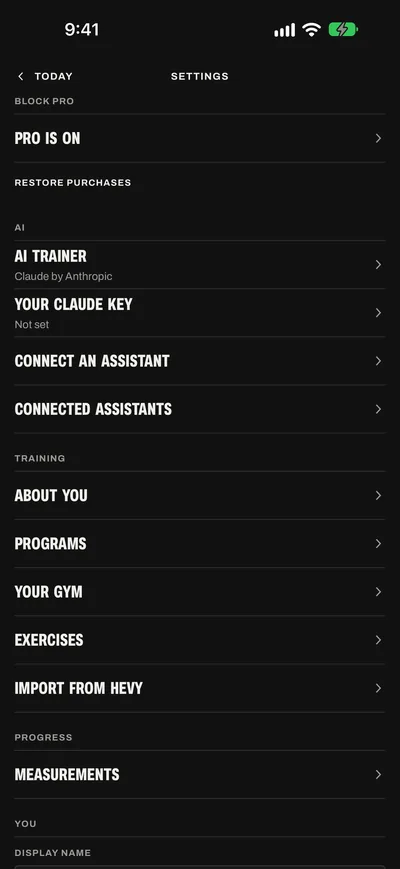
The AI group in Settings Ask the trainer
Tap Ask trainer on Today or Plan, and ask a question.
The line under the message field shows Claude Sonnet 5 and your key. Tap the line to open About the trainer, which names the same AI model.
In a session, the line names the session instead. Below iOS 27, it reads Needs iOS 27, and the trainer does not answer.
What it costs
Anthropic bills your Console account for each request your key makes. Block takes nothing for these messages. You still need Block Pro for the trainer.
Claude Sonnet 5 prices
- InputPer million tokens$2
- OutputPer million tokens. Thinking counts as output.$10
- Cache readsPer million tokens$0.20
- Cache writesPer million tokens, for 5 minutes$2.50
- Web searchPer search ($10 per 1,000). The pages it reads count as input tokens.$0.01
From Anthropic's pricing page on 2 October 2026. Check it for the current prices.
How requests add up
One question can take several requests. When the trainer reads your log, a program or the research, it takes a tool step. Each tool step is a new request that sends the chat again with the new result. A question can take up to 8 tool steps.
Each request can search the web up to three times. Each answer can be up to 8,192 output tokens. Later messages in a chat send the earlier ones again, so a long chat costs more for each message.
The app marks the trainer's instructions and tools for Anthropic's prompt cache. A request within 5 minutes of the last one reads them at the cache price.
Questions the app asks for you
After you save a session, the app asks the trainer for the workout's next targets. After you save About you, or after a Hevy import, it asks the trainer to write your first rules file. With your key, these go on your Console bill too.
Estimates, not quotes
| What you ask | Requests | Estimate |
|---|---|---|
| A short question the trainer answers from its context | 1 | About $0.04 |
| A question that reads your log once | 2 | About $0.08 |
| Next targets after a session | About 4 | $0.12 to $0.20 |
| A first proposal for a 16-week block | About 7 | $0.25 to $0.50 |
- We worked these out from the prices above. Your real bill depends on how long your chat and the answers are.
- Each request carries about 11,000 tokens of the trainer's instructions and tools, about 4,000 tokens of your training data, and the chat so far.
- Each tool result is about 2,000 tokens. Each tool step writes about 400 to 600 output tokens, thinking included.
- The last answer is about 600 tokens for a question, 1,500 for next targets and 7,000 for a block.
- No web searches. Each search adds $0.01 and the pages it reads.
- The ranges show the cost with and without Anthropic's prompt cache.
Watch your spend
The Console's Usage page shows your tokens and requests. Billing shows your credit balance and your spend limit. Check them after your first week to see your real cost.
When Block still pays
When your key cannot answer, the built-in trainer answers that question: Apple's model where your iPhone supports it, else Claude through Block, and it counts against your monthly messages. On an iPhone where you did not save your key, the built-in trainer answers every message.
When your key cannot answer
The chat shows a notice. Then the built-in trainer answers that question.
Your Claude key did not answer. The reason. The built-in trainer answers this time.
When Claude through Block answers and you have not allowed it yet, the Send to Claude? sheet asks first. At Verify & save key, the same reasons show under the field, and the app does not save the key.
Anthropic refused your Claude key. Check it in Settings > AI > Your Claude key.
Anthropic did not accept the key: it is wrong, disabled, deleted or expired. Create a new key in the Console. In the Block app, open Settings > AI > Your Claude key. Tap Remove key. Then save the new key.
Your Claude key cannot use Claude Sonnet 5.
The key's organization or workspace cannot use the model. Check your organization's access and workspace settings in the Console.
Anthropic: …
The rest is Anthropic's own message. It names the problem: no credit, your spend limit, a key for several workspaces, or the organization. Fix it in the Console. Then ask again.
Your Claude account is at its rate limit. Try again in a minute.
Wait a minute. Then ask again. If the message stays, your organization may be at its usage tier's monthly spend cap. The Console's Billing page shows the cap.
Claude is busy. Try again in a minute.
Anthropic's servers are busy or had an error. Ask again later.
The trainer is busy. Try again in a minute.
Anthropic was busy, at a rate limit or had an error while the answer came in. Ask again later.
The chat is too long for Claude. It starts fresh with your next question.
The request was too large. The app stops sending the earlier chat, so your next question starts a new chat for Claude. The messages on screen stay, and so do your rules file and lift notes.
Claude could not read this chat. It starts fresh with your next question.
Anthropic could not read the request. Your next question starts a new chat for Claude, as above.
The answer ran past its length limit, so the trainer stopped. Try again, or ask for one part at a time.
The app stops an answer at 8,192 tokens. Ask for one part at a time, for example one workout of the block.
That took too many steps, so the trainer stopped. Ask again, or ask for one workout at a time.
The app stops a question after 8 tool steps. Ask for one workout at a time.
Claude's answer was cut off. Try again.
The answer stopped before its end. Ask again.
Claude could not be reached. Try again.
Anthropic sent another error. Ask again. If the message stays, check your account in the Console.
No connection
With no connection, nothing answers: the built-in trainer needs one too. The question shows Not answered and Check your connection, then try again. Your question is still here. Tap Try again when you are back online.
Privacy and security
Your key and your chat go from your iPhone to Anthropic. Block's server never receives the key, your questions or the answers.
- What is sentYour question, the chat so far, the trainer's instructions and the training data the answer needs, to api.anthropic.com with your key. What Anthropic keeps follows your own agreement with Anthropic.
- Where the key livesIn this iPhone's Keychain, for your Block account only. It does not sync to iCloud and does not move to a new iPhone. On another iPhone, save it again. When you sign out, the key stays on this iPhone for your account.
- Delete your accountDeleting your Block account removes the key and the chat from that iPhone.
- A subscription is not a keyA Claude Pro or Max plan does not include the API. The app refuses a subscription token, which starts with sk-ant-oat.
- Remove keyOpen Settings > AI > Your Claude key. Tap Remove key. The app asks Remove your Claude key? and says The key leaves this iPhone. It stays valid until you delete it in the Claude Console. Then delete the key in the Claude Console, under Settings > API keys.
- Disable or deleteIn the Console, Disable stops a key and Re-enable starts it again. Delete is permanent.
- Change to a new keyCreate a new key in the Console. In the Block app, open Settings > AI > Your Claude key. Tap Remove key. Paste the new key, then tap Verify & save key. Delete the old key in the Console.
- A lost iPhoneDelete the key in the Console. Then no device can use it.
The privacy policy has the details.
Other ways to use AI in Block
- The AI trainerEverything the trainer does: programs, next targets, changes while you lift, and the research behind each call.
- Connect an assistantHave a Claude plan and no API key? Connect Claude to Block. You chat in Claude's own app, on your Claude plan, and Claude reads and saves your training in Block. It needs Block Pro.